JSON test results data format for test frameworks
For consistency, interoperability, efficiency and compliance
Apr 2, 2023 · Updated: Jul 4, 2026
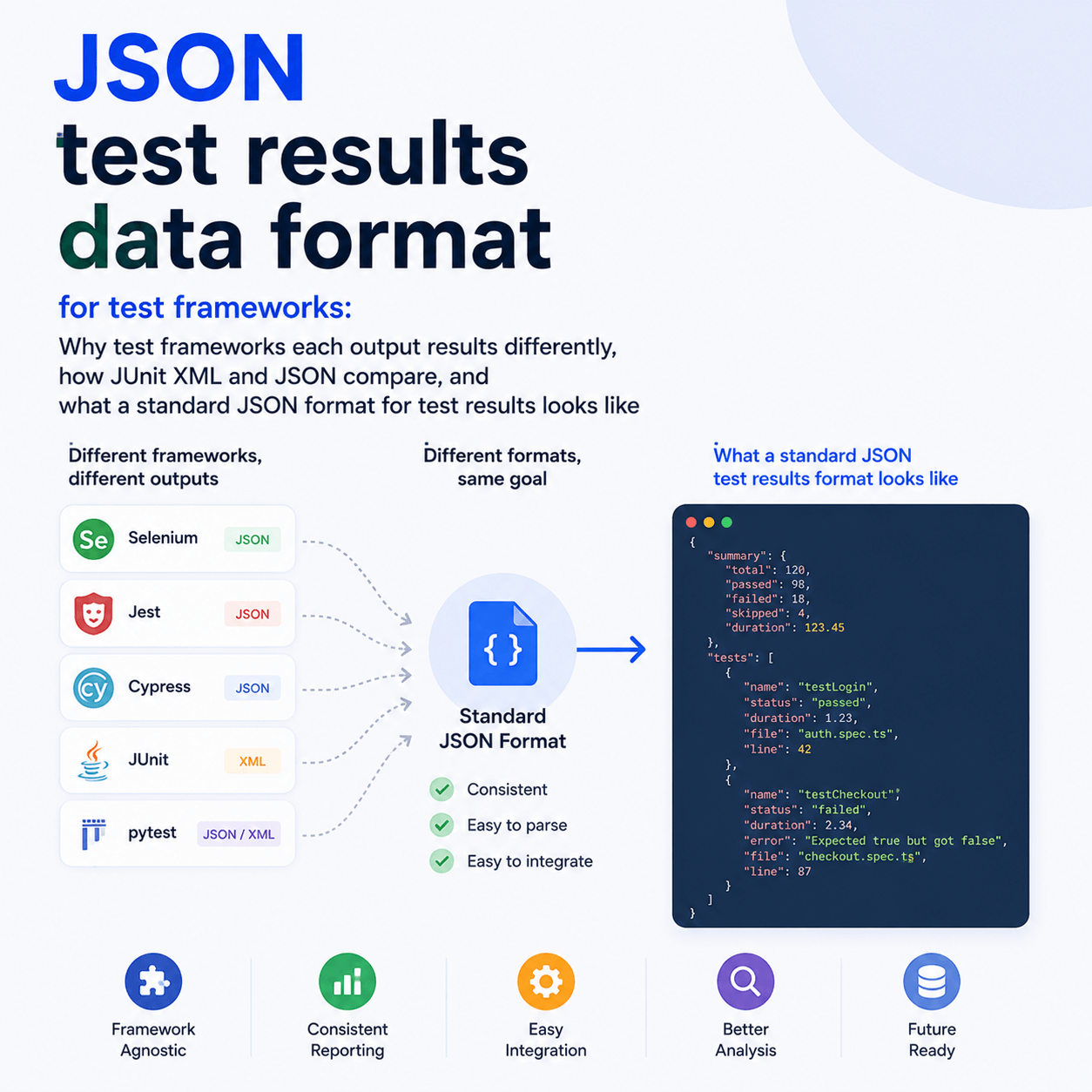
There is no universal standard for how test frameworks output results data. Each framework represents its results in its own custom format, and even the listener or event interfaces they expose for programmatic access are specific to each framework. The closest thing to a common format is JUnit XML, which many frameworks can emit, but XML has real drawbacks and JSON has become the more widely used format for data interchange. This post explains why the formats differ, how JUnit XML and JSON compare for test results, and what a standard JSON format for test results looks like in practice.
Why does every test framework output results differently?
Test frameworks were built independently, at different times, for different languages, by different authors, with no shared specification for what results should look like. So pytest, JUnit, Jest, TestNG, Mocha, NUnit, Go, and the rest each represent a test result in their own structure, with their own field names and their own idea of what metadata to include. Most frameworks offer a listener, reporter, or event hook so you can access results programmatically as they are generated, but those interfaces are also custom to each framework. The result is that consuming test results from more than one framework means writing a bespoke adapter for each one, because there is no common shape to rely on.
What about JUnit XML, is that not the standard?
JUnit XML is the closest thing the ecosystem has to a standard, and it is genuinely useful. It originated in the Java world and became the de facto interchange format that a wide range of frameworks can emit, either natively or through a reporter, which is why so many tools accept it as input.
It has two real drawbacks, though. The first is that the format is loosely defined, so some parser tools fail or behave inconsistently when custom fields are present, because there is no strict agreed schema for anything beyond the basics. The second is simply that JSON has overtaken XML as the common format for data interchange across software generally. Most modern tooling, APIs, and developers reach for JSON first, and XML increasingly feels like a legacy choice. JUnit XML remains a practical lowest common denominator for getting results out of a framework, but it is not a rich or modern format for representing them.
Why use JSON for test results data?
JSON has become the default interchange format for good reasons that apply directly to test results. It maps cleanly onto the data structures developers already work with, it is readable, it is trivial to produce and parse in every language, and it handles nested and custom fields naturally, which is exactly where JUnit XML gets awkward. Test results are inherently structured and often carry extra context (custom fields, parameters, attached files, timing detail) that a rich JSON structure represents comfortably and a rigid XML schema does not. For representing, transmitting, and consuming test results programmatically, JSON is the more natural fit.
What does a standard JSON format for test results look like?
A useful test results format needs to capture the essentials in a predictable structure: the suite a test belongs to, the test name, its result (pass, fail, and so on), and then the richer context that makes results actually useful, such as a failure reason, parameters, timing, and references to attached files like logs and screenshots. The value of standardising this is that any tool consuming the data knows exactly what to expect, rather than reverse engineering a different shape per framework.
As a concrete example of one such format, Tesults defines the Tesults JSON data standard, a JSON format for specifying results output. Every Tesults test framework integration transforms the framework's custom output into this standard JSON, which is then used to transmit results to the Tesults service, and when the Tesults API is used to retrieve results, the same JSON format is returned in the response. It is deliberately simple to understand and implement, and it has been used in production for several years. In the absence of any other common JSON test results format, it is one worked example of what such a standard can look like.
A note for test framework authors
If you author a test framework, offering results output in a well defined JSON format makes your framework easier to integrate with the wider tooling ecosystem, reporting dashboards, CI systems, and analysis tools, without every consumer having to write a custom adapter. There is no universally adopted JSON test results standard yet, so this is still open ground. The Tesults JSON data standard is used across the core Tesults service, its APIs, and its integrations for popular test frameworks, and is available as a reference. If you are a test framework author and have questions or feedback, contact help@tesults.com.
For the full field level specification, see the Tesults JSON data standard documentation, and if you want to get results from your framework into a dashboard, the guide to viewing JUnit XML results in a dashboard covers the practical upload side.