






Consolidated test automation reporting

Ready to release?
See the whole test picture.

Review every automated run across your frameworks, pipelines and systems in one place. When it’s time to release, bring the results, remaining manual checks and approvals together. Keep a record of what was tested and approved.

Get set up in 5 minutes

Keep your test frameworks. No time limit on the free plan.

See the 5-minute setup. No need to define automated test cases first.

Review results in Tesults, query them from your AI agent, or use them in your CI pipeline.

tesultsAcross your systems

Release 2.8

Automated test evidence · Build 2.8.0

1 failure to review
Web checkoutPlaywright · Web pipeline
1 failed
Payments APIpytest · API pipeline
Passed
Order serviceJUnit · Backend pipeline
Passed
Admin dashboardCypress · Admin pipeline
Passed
The API and service checks passed. Checkout still needs attention.
Review the whole picture before you ship.
From testing to releaseConsolidated automated resultsManual test managementRelease checklistsRelease records

Trusted by teams at

NikeHuluIntelHP EnterpriseFujitsuSiemensTargetUbisoft
What customers say
“Tesults is our dashboard of choice. We’ve rolled it out to the team.”
Ryan KenneyLead Software Engineer
“This is wonderful! The APIs and integrations are very useful for us.”
Aaron RobertsSenior Software Engineer
★★★★★
“Brings the fruits of test automation to life.”
Verified Customer
The release workflow

See what needs attention
before the next release.

Start with your automated results. Review failures, complete the remaining checks and record the evidence for the release.

01Consolidate test resultsCollect results from your frameworks and pipelines in one place.

Review automated results across your systems.

Your web, API and service tests already run in different places. Send their results to Tesults so the team can review failures, logs and history without piecing together separate reports.

Your tests continue to run where they do today. Tesults brings their results together.
RELEASE 2.8 / STEP 01Illustrative example

What passed across our systems?

Web checkoutPlaywright · build 2.8.0
1 failed
Payments APIpytest · build 2.8.0
Passed
Order serviceJUnit · build 2.8.0
Passed
The shared pictureThe API and service checks passed. The web checkout needs attention.
02Review failures & changesIdentify regressions and flaky tests, then inspect the failure details.

Find out what failed and what changed.

Tesults highlights differences between test runs and flags flaky tests from their history. Review new failures, inspect errors, logs and screenshots, and see which tests have recovered before deciding what needs to be fixed.

The team can review the same failure details without searching through separate CI reports.
RELEASE 2.8 / STEP 02Illustrative example

Why did checkout fail?

Submit orderWeb checkout · Playwright
Failed
Error messageConfirmation not visible after 30s
Timeout
Attached evidenceBrowser screenshot & test log
Available
Next actionReview the screenshot and log to investigate the missing confirmation.
03Complete release checksManage manual tests and track the remaining deployment tasks.

Cover what automation does not test.

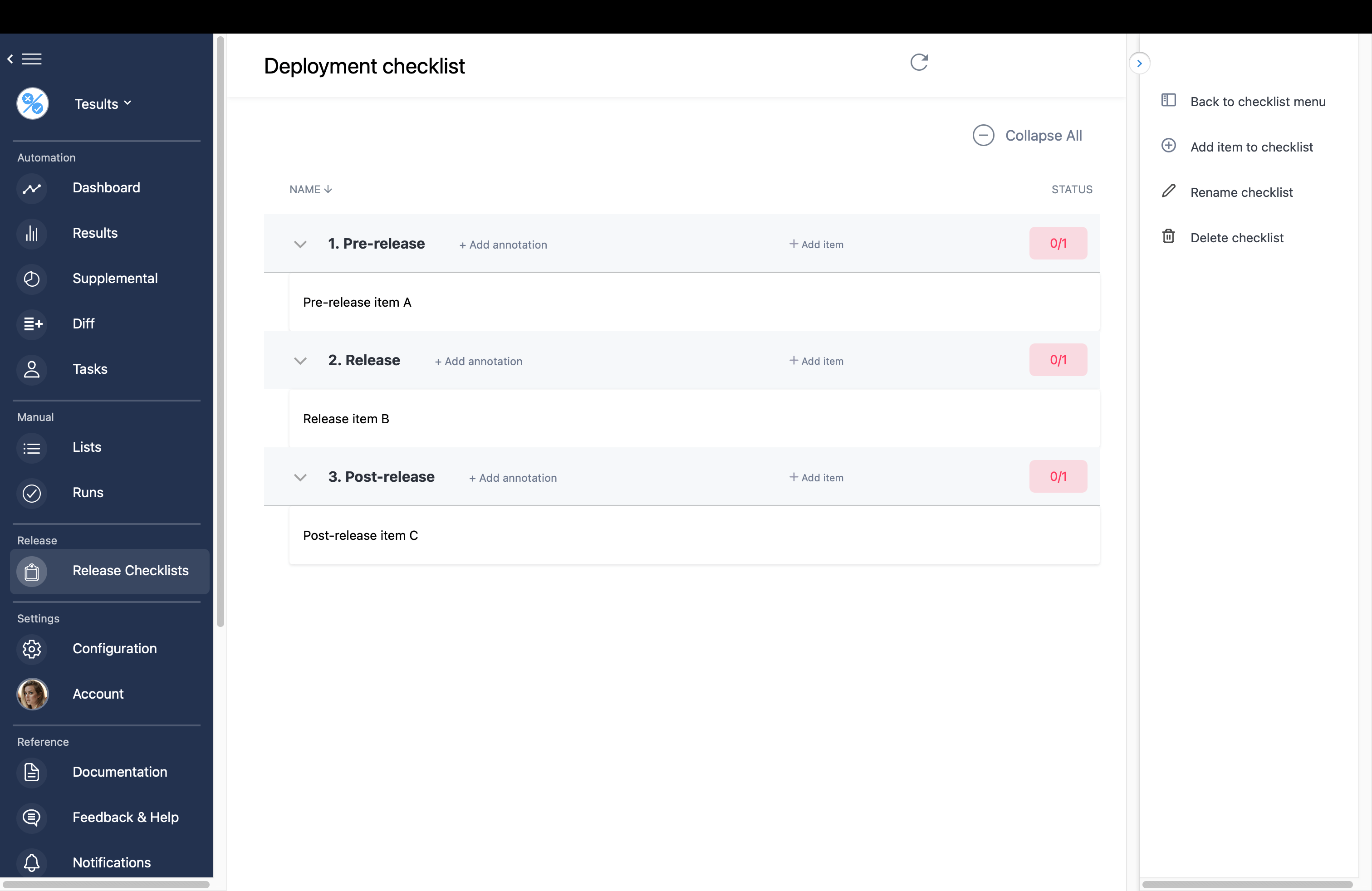
Manage reusable manual test cases, assign tests and record the results. Use release checklists to review automated and manual runs alongside tasks such as confirming a rollback procedure. See what still needs doing before, during and after deployment.

Passing automated tests do not tell you whether the remaining release checks are complete.
Tesults release checklist with pre-release, release and post-release groups
Actual Tesults release checklist. Open the image for a closer look.
04Record the releaseSave the automated and manual results with the team’s approvals.

Keep a record of what was tested and approved.

Attach automated and manual test runs to a release record. Collect team approvals and seal the record when the release is complete. Keep the results that supported the decision, even as testing continues on the next build.

When someone asks what was tested for a release, you have the record.
RELEASE 2.8 / STEP 04Illustrative example

What did we check before shipping?

Automated test runsResults for the release attached
Recorded
Manual test runCompleted test results attached
Recorded
Team approvalsRelease record signed off
Sealed
Release historyThe test results and approvals remain available for later review.
Your test results, available to your AI agent

Ask your agent what failed, what changed and what needs attention.

Connect the Tesults MCP server to Claude Desktop, Claude Code, Cursor or another MCP-compatible client. Your agent can query uploaded test results and history without you copying logs into chat or checking each dashboard.

Configure the MCP server with a Tesults API token, then ask about failures, flaky tests or regressions. The agent calls Tesults tools to retrieve the evidence for its answer.

Illustrative conversation with a connected agent. Sample test data.
You
Why did the nightly build fail?
Agent · tesults_explain_run
149 of 150 tests passed. “Submit order” failed in Checkout. The reported error is a payment gateway timeout after 30 seconds. That identifies the failure to investigate, not a confirmed underlying cause.
You
Has that test been failing intermittently?
Agent · tesults_get_flaky_tests
Yes. “Submit order” failed in 4 of the last 10 runs and is classified as likely flaky. Review its history before treating this as a new regression.
You
What changed since the previous run?
Agent · tesults_what_changed
“Submit order” is newly failing compared with the previous run. “Load homepage” recovered. A newly failing result can still belong to a historically flaky test.
Test intelligence API

Use the same analysis in your CI pipeline.

Query the Insights API directly from your own tools, deployment checks or agents. Get structured results without collecting and comparing every raw test report yourself.

Why did the run fail?

Retrieve a run summary, failed tests and failure patterns to guide investigation.

GET /api/insights/explain-run
Illustrative result summary149 passed, 1 failed.
Checkout: “Submit order”.
Reported error: payment gateway timeout.

Failure analysis API →

Which tests are flaky?

Identify tests that alternate between passing and failing. Retrieve failure rates, last failure timestamps and classifications.

GET /api/insights/flaky-tests
Illustrative result summarySubmit order: 40% failure rate.
Load checkout: 30% failure rate.
Classification: likely flaky.
Flaky test API →

What changed between runs?

Separate new failures from continuing failures and recovered tests. Feed the comparison into your deployment checks.

GET /api/insights/what-changed
Illustrative result summaryNew failure: Submit order.
Recovered: Load homepage.
Continuing failures: none.
Run comparison API →

Send results to the people who need them.

Notify the team in Slack, Microsoft Teams or Mattermost when results arrive. Create Jira issues from failed tests and update issue status from later results. Use PagerDuty to route incidents.

Developer working at a laptop in a modern office
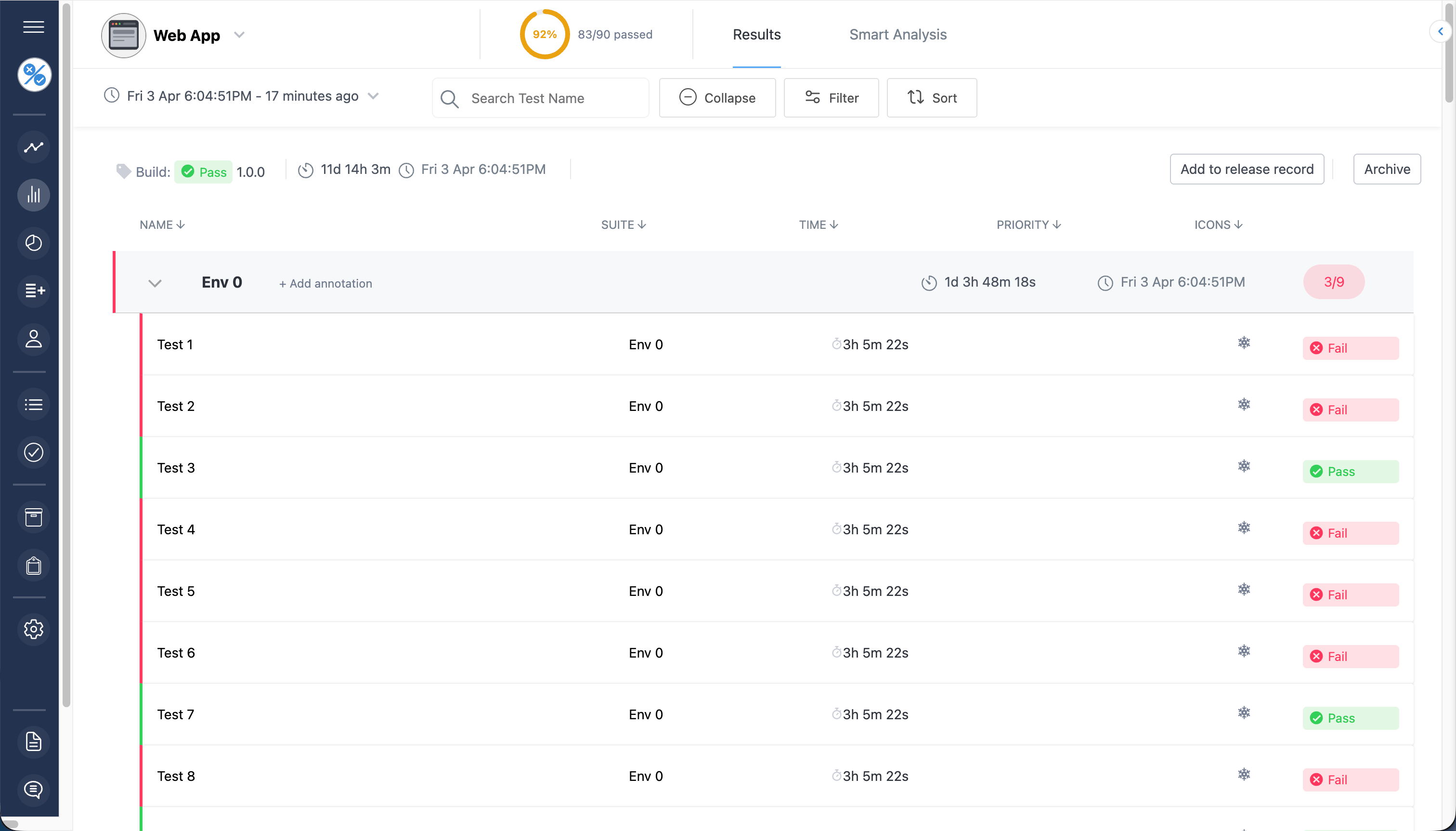
The Tesults results interface for reviewing individual test results
Every automated run

Go from a failed run to the test details.

Review individual results and the logs, screenshots and files uploaded by your tests. Compare runs to see what changed, without collecting reports from separate pipelines.

Explore test results →
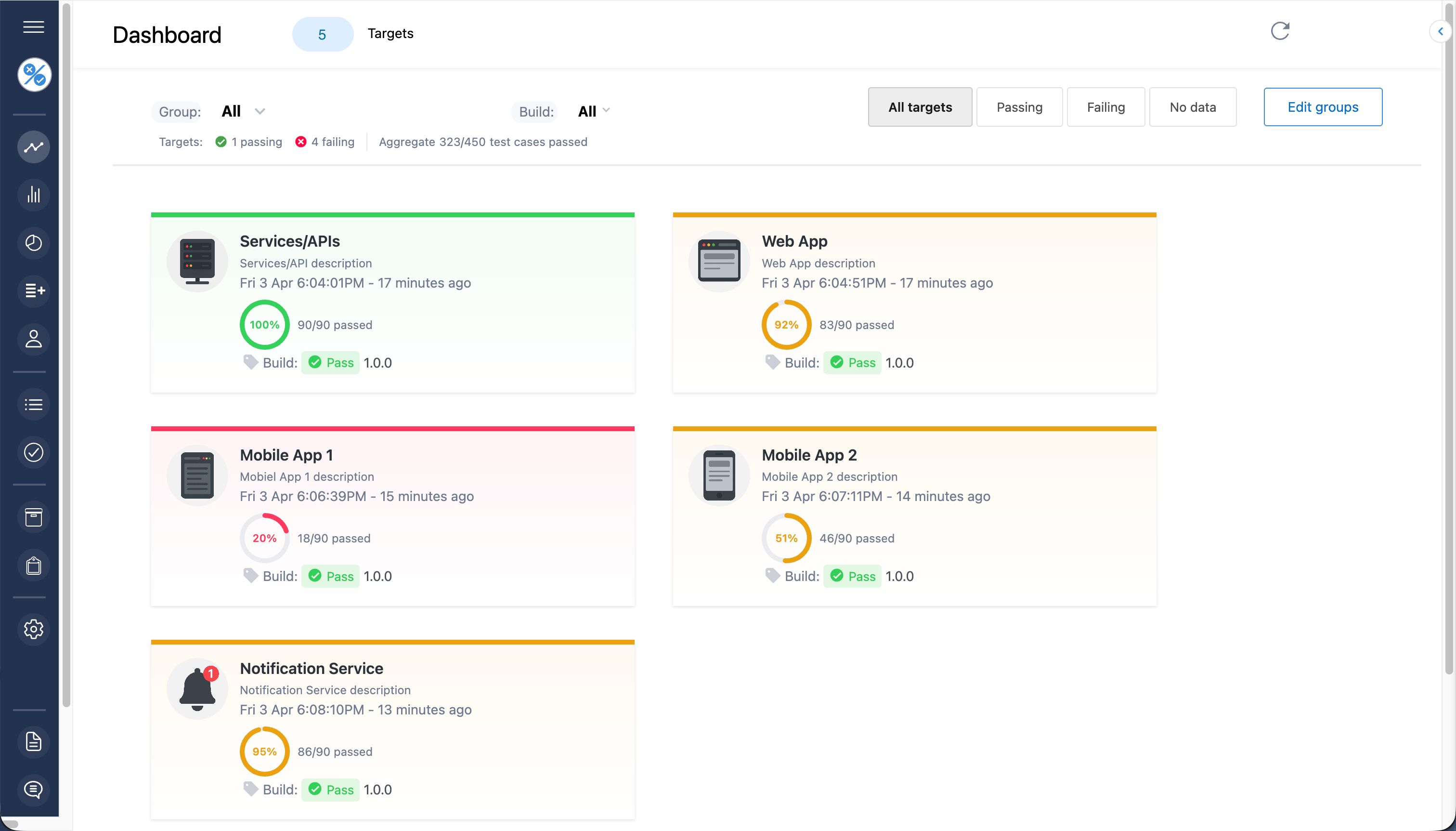
The Tesults dashboard showing test results across multiple targets
Inside Tesults: the dashboard. Select the image for a closer look.
Visibility beyond a single test suite

One place for the team
to see how testing is going.

A report from one framework tells you about one part of your system. Tesults brings results from your different targets together so the team can review the broader picture, spot failures and drill into the details.

Explore the dashboard
Customer-reported outcomes

What better visibility has meant for teams.

Experiences shared by Tesults customers. Individual outcomes vary.

  • Prevented over a million dollar loss by averting a serious flaw from entering production.
  • Saved hundreds of hours of developer time with notifications of regressions for specific builds.
  • Minimized earnings disruption of hundreds of thousands of dollars by being alerted to a production incident from a test failure.
  • Helps us with ISO 27001 compliance.
  • Raised awareness of testing and quality across the organization.
  • “Would never go back to being without it. Was like flying blind.”
Manual testing and release management

Track the work that remains before you ship.

Keep reusable manual test cases and assign them to testers. Link automated results and manual runs to release checklists, alongside your deployment tasks. When the team signs off, preserve the test results and approvals in a release record.

Two developers discussing code on a monitor in their office
Get set up in 5 minutes

Works with the tests you already run.

Start by collecting automated results. Add manual tests, checklists and release records as your team needs them.

Setup guide
  1. Create a projectChoose a target for the suite whose results you want to collect.
  2. Add the integrationConfigure your framework’s reporter or a Tesults library with your target token.
  3. Run your testsThe integration uploads results to Tesults. You do not need to define automated test cases first.
Developer with glasses working on a laptop at her desk

Using a custom test framework?

Use a Tesults language library to upload results from your own test systems, or submit results through the REST API.

Mobile app

Check results when you’re away from your desk.

Access your test results and dashboards with the Tesults mobile app for iOS and Android.

Explore the mobile app →
Developer checking his phone while walking along a New York City sidewalk

A few practical questions.

Do we have to change how our tests run?

No. Keep your existing frameworks and CI pipeline, and add a Tesults integration to send results. You don’t need to create automated test cases in Tesults before uploading results. See the integration guides.

How do manual testing and release management fit together?

Manage reusable test cases in Lists and execute them in Runs. Link manual runs and automated test targets to release checklists for review. Attach test runs to a release record to preserve the results and team approvals. You can use these together or start with the parts your team needs.

Can we use custom test frameworks?

Yes. Alongside integrations for popular frameworks, Tesults provides libraries and an API for submitting results from your own test systems. Explore the integration options. Missing an integration? Contact us for help connecting your framework.

Can the team review results outside the CI pipeline?

Yes. Tesults provides dashboards and detailed results in its own interface, so team members can review uploaded test results without navigating each pipeline’s separate reports.

Does Tesults support single sign-on?

Yes. SAML 2.0 and Google OAuth are supported, and SSO is included on the free plan. See the SSO configuration guide.

Can we export our results and test cases?

Yes. Export test results and saved test lists to CSV, or retrieve results through the API for use in your own systems. Export test lists or read the results API guide.

Can we try it for free?

Yes. There is no time limit on the free plan. Compare plans and limits to choose what fits your team.

How does billing work when our team changes?

On paid plans, Tesults charges for active users only and automatically stops billing for inactive users. You do not need to manually remove unused seats. See the Fair Billing Policy and pricing and plan limits.

Plan your next release with Tesults

Know what passed,
what is left and who signed off.

Review your automated results, complete the remaining checks and keep the release record.

Start free

No time limit on the free plan.